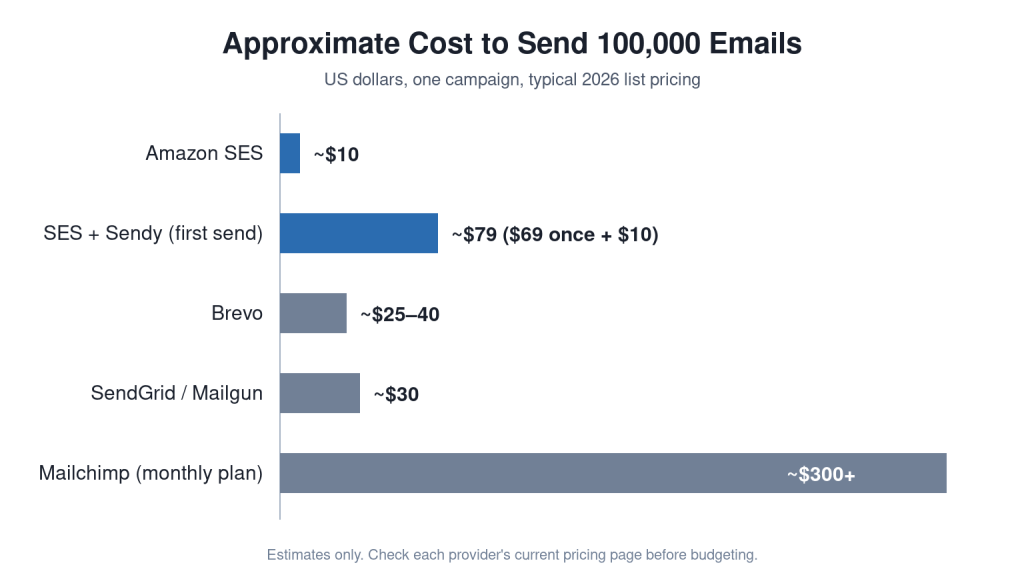
Quick answer: Amazon SES (Simple Email Service) is a pay-as-you-go email sending service from AWS. It costs about US$0.10 per 1,000 emails, so 100,000 emails cost roughly US$10. You verify your domain, request production access, set up SPF, DKIM and DMARC, then send through its API or SMTP. It suits startups that want low cost and control.
Introduction
Most startups outgrow their Gmail outbox quickly. Once a list passes a few thousand contacts, you need a proper sending platform. Monthly newsletter tools get expensive fast.
Amazon SES is the lowest-cost serious option. It powers email for many large apps, yet a two-person startup can use it for the price of a coffee per campaign.
This guide covers what Amazon SES is, what it costs, how to set it up step by step, and when a simpler tool is the better choice.
What Is Amazon SES?
Amazon SES is a cloud email service that sends marketing, transactional and notification emails from your own domain. You pay only for what you send, with no monthly plan. It provides the sending engine; you supply the list, content and, optionally, a user interface.
What Amazon SES Is Not
- It is not a drag-and-drop newsletter builder out of the box.
- It does not provide contact lists or leads.
- It does not allow sending to purchased or scraped lists.
Why Amazon SES Matters for Startups
Amazon SES matters because it cuts email costs by 90% or more compared with monthly newsletter platforms at scale. For a startup with 100,000 contacts, that is often the difference between US$10 and US$300 per month.
It also keeps your sending on your own authenticated domain, which builds long-term sender reputation you control.

Benefits of Amazon SES
- Very low cost: about US$0.10 per 1,000 emails, with a small free allowance for new accounts.
- Scale: sending limits rise as your reputation grows, up to millions a day.
- Regional hosting: an Asia Pacific (Sydney) region is available for Australian businesses, plus Mumbai for India.
- One service for everything: newsletters, password resets, OTP codes and invoices.
- Detailed events: bounces, complaints, deliveries, opens and clicks can feed your CRM.
- Flexible: use the API, SMTP, or a front end such as Sendy.
Challenges and Risks of Amazon SES
The main challenge is that SES is infrastructure, so you are responsible for list quality, unsubscribes and technical setup. It rewards teams that have some technical help.
The Sandbox
New accounts start in a sandbox. You can send only to verified addresses, up to 200 emails a day. You must request production access and explain your use case, list source and unsubscribe process.
Reputation Thresholds
AWS watches bounce and complaint rates. As a rule of thumb, keep bounces under 2% and complaints under 0.1%. If they rise too far, AWS may pause your sending.
Technical Setup
You need access to your DNS settings and, for campaigns, either a front-end tool or a developer to connect SES to your CRM.
Amazon SES vs Other Email Platforms
Here is how Amazon SES compares with common alternatives for a startup sending about 100,000 emails a month.
| Factor | Amazon SES | Brevo | SendGrid | Mailchimp |
|---|---|---|---|---|
| Approx. cost per 100,000 emails | ~US$10 | ~US$25–40 | ~US$20–35 | ~US$300+ a month |
| Built-in campaign editor | No (add Sendy or similar) | Yes | Yes | Yes |
| Setup effort | Medium | Low | Low to medium | Low |
| Transactional email | Excellent | Good | Excellent | Paid add-on |
| Best for | Cost-focused, technical teams | Non-technical teams | Developer-led products | Marketing teams with budget |
Cost Comparison in Practice
A startup emailing 100,000 contacts four times a month sends 400,000 emails. On SES that is about US$40. On a contact-based newsletter plan it can be ten times more.
How to Set Up Amazon SES: Step by Step
Setting up Amazon SES takes about one to three days, mostly waiting for production access approval.
- Create an AWS account and choose a region close to your audience, such as Sydney or Mumbai.
- Pick a sending subdomain, for example news.yourbrand.com, to keep marketing separate from your main email.
- Verify the domain in SES and add the three DKIM records it gives you to your DNS.
- Add SPF and a custom MAIL FROM domain so the sending domain aligns with your brand.
- Publish a DMARC record, starting with a monitoring policy (p=none), then tighten it later.
- Request production access with a clear description of your list source, consent and unsubscribe process.
- Set up bounce and complaint handling with a configuration set and notifications, and remove bad addresses automatically.
- Add one-click unsubscribe using the List-Unsubscribe header, which Gmail and Yahoo require for bulk senders.
- Connect a sending tool: Sendy, your CRM, or a simple script using the SES API.
- Warm up gradually, starting with your most engaged contacts and increasing daily volume over two to three weeks.
Timeline Comparison
| Stage | Typical time |
|---|---|
| Domain verification and DNS | 1 hour to 1 day |
| Production access review | Usually within 24 to 48 hours |
| Tool or CRM integration | Half a day to a few days |
| Warm-up to full volume | 2 to 3 weeks |
Best Practices for Amazon SES
Actionable Checklist
- Send only to opted-in contacts or existing customers.
- Verify your list before the first send and remove role addresses like info@ where possible.
- Keep marketing and transactional email on separate subdomains or configuration sets.
- Include your business name, physical address and an unsubscribe link in every campaign.
- Suppress bounced and unsubscribed contacts permanently.
- Monitor bounce and complaint rates after every campaign.
- Use Google Postmaster Tools to track how Gmail sees your domain.
- Consider a dedicated IP address only once you send several hundred thousand emails a month.
When Should Founders Choose Amazon SES?
- Choose SES when cost matters and you have a developer or technical co-founder.
- Choose SES when you need transactional and marketing email from one service.
- Choose Brevo or MailerLite when a non-technical team needs a visual editor today.
- Choose Mailchimp or similar when advanced marketing automation matters more than cost.
Founder Perspective
“We moved our 80,000-contact newsletter from a monthly platform to SES with Sendy. Setup took a weekend, approval took a day, and our email bill dropped from hundreds of dollars a month to under twenty. The real work was cleaning our list, which also lifted our open rate.”
(Composite scenario based on typical startup migrations, not a single named company.)
For investors, a startup that runs email on its own authenticated domain with tracked bounce and complaint rates shows it owns a durable, low-cost channel rather than renting reach.
Key Takeaways
- Amazon SES costs about US$0.10 per 1,000 emails, roughly US$10 per 100,000.
- New accounts start in a sandbox and need production access approval.
- SPF, DKIM, DMARC and one-click unsubscribe are essential for inbox placement.
- SES is the sending engine; add Sendy, a CRM or code for campaigns.
- Warm up over two to three weeks and keep complaints under 0.1%.
Frequently Asked Questions
How much does Amazon SES cost?
Sending costs about US$0.10 per 1,000 emails, plus small charges for attachments and optional add-ons. New accounts get a limited free allowance for the first year.
Can I use Amazon SES for marketing emails?
Yes. SES allows marketing email to opted-in recipients. You must include an unsubscribe option and handle bounces and complaints.
How do I get out of the Amazon SES sandbox?
Submit a production access request in the SES console. Describe your email type, how contacts opted in, and how you handle unsubscribes and bounces.
Is Amazon SES available in Australia?
Yes. SES runs in the Asia Pacific (Sydney) region, which suits Australian startups with local data preferences.
Does Amazon SES have a newsletter editor?
Not a full campaign builder. Most startups pair SES with a tool such as Sendy, or connect it to their own CRM or app.
How many emails can I send per day with Amazon SES?
Limits start low after sandbox exit, often tens of thousands a day, and increase automatically as you build a good sending record.
Is Amazon SES better than Mailchimp?
SES is far cheaper at scale but needs more setup. Mailchimp is easier for non-technical teams but costs much more for large lists.
Conclusion
Amazon SES gives startups bulk email at a fraction of the usual cost, as long as they handle setup and list hygiene properly. Start with a clean, opted-in list, an authenticated subdomain and a gradual warm-up.
If you’re weighing shortcuts like free mailbox farms instead, read why snowshoe spamming backfires first.